↓ Skip to main content

Task management

Steps to create a task
#

  • Give it a title
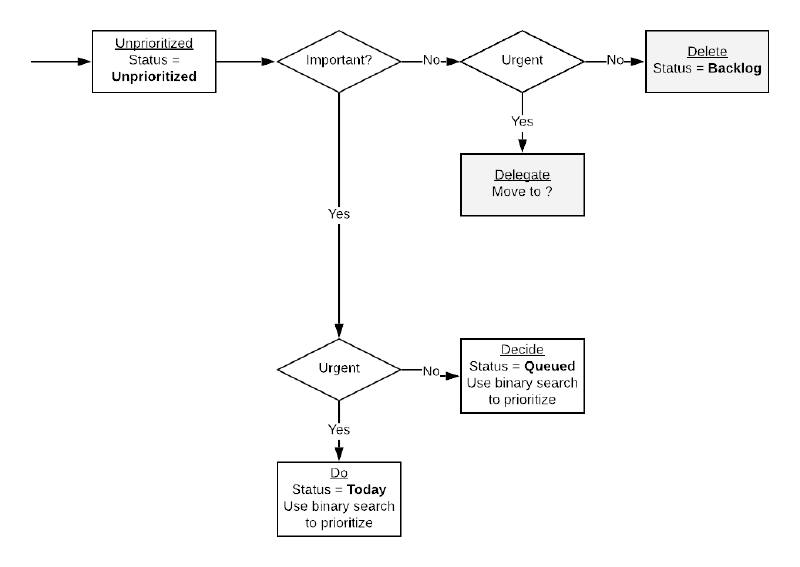
  • Decide if it’s important or not
  • Decide if it’s urgent or not
  • Estimate the effort required to accomplish the task (in hours)
  • Estimate the value the task brings (in $)
  • Give it at least one label
  • Give it an assignee
  • Give a description if necessary
  • Set a deadline if possible
  • Set status to Unprioritized (ideally automatically/default)
  • Indicate who requested the task
  • Indicate which users/how many users would be affected by the task
Task creation
Task states

Statuses
#

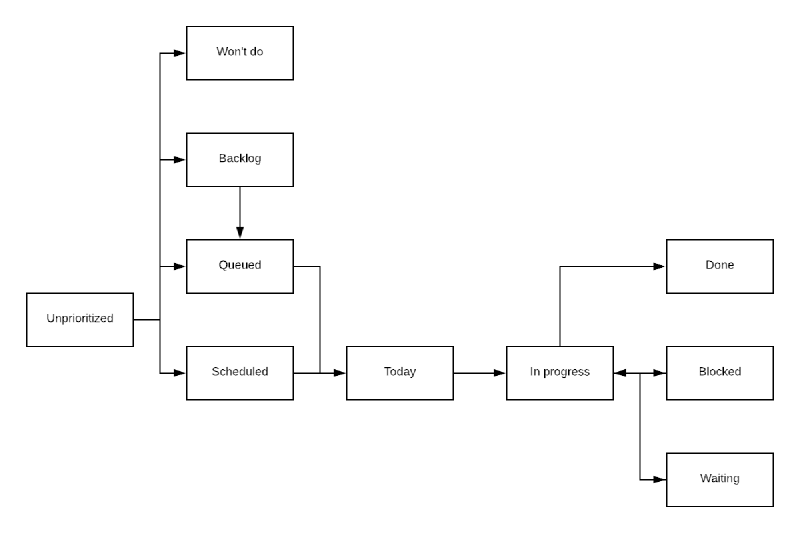
  • Unprioritized: New task are created as unprioritized, so as to avoid having to put them in a state immediately when creating them.
  • Won't do: A task that ends up not being relevant or useful will not be acted further upon and set to “Won’t do”.
  • Backlog: A task that is not of priority at the moment but something that would be worthwhile to do at some point in the future (although maybe never due to other priorities).
  • Queue: A task with a priority that is not high enough to be done immediately but that should be done in the near future.
  • Scheduled: A task that has been scheduled to be done by a specific date.
  • Today: A task that is scheduled to be done today. Tasks picked from the queue are moved to today.
  • In progress: Tasks that are were in progress yesterday but aren’t blocked, waiting, or done are moved back to today, the queue, or the backlog.
  • Blocked: A task that is blocked by something else. The task should be moved back to today when it is unblocked.
  • Waiting: A task that is waiting for something to happen before it can be worked on. The task should be moved back to today when it is unblocked. The difference between a blocked task and a waiting task is that a blocked task is blocked by something that is not under your control, while a waiting task is blocked by something that is under your control.
  • Done: A task that has been completed and does not require further action.

During a workday
#

  • Go through the tasks in the Do section, then the Decide section, then Delegate

Important/Urgent
#

Use Eisenhower matrix to determine task importance/urgency

  • Tasks that are not important/not urgent are moved to the backlog.
  • Tasks that are not important/urgent are delegated to someone else.
  • Tasks that are important/not urgent should be scheduled.
  • Tasks that are important/urgent should be done ASAP.

Effort/Value/ROI
#

Using the estimated effort and estimated value of a task, you can compute the return on investment (ROI) of the task as estimated value divided by estimated effort. For example, a task you estimate is worth 100 $ and takes 2 hours to complete will have a ROI of 50 $/h.

Use the ROI of your tasks to prioritize them. You will want to complete the tasks which are likely to have the best return on investment.

The ROI metric will also give you clues about the task you should probably not spend your time on. If you are paid 50 $/h and a task has a ROI less than 50 $/h, then it should probably be moved to the backlog and only reconsidered if its ROI changes.

Task processing
#

  • Unprioritized tasks should be moved to Queued, given their priority compared to already queued tasks.
  • You should attempt to keep the Unprioritized tasks count to 0.
  • A task that is Queued should have a deadline date.
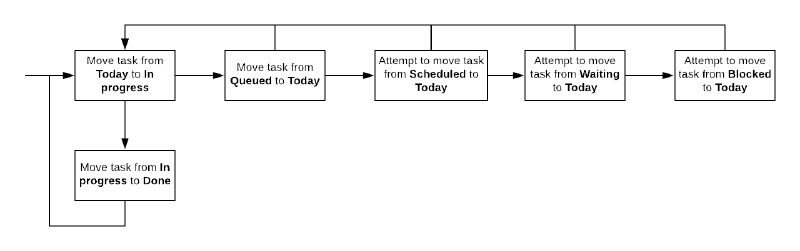
  • Work on tasks In progress first, then take tasks from Today, then from Queued.
  • When moving a task to Blocked or Waiting, add a comment indicating why it is blocked/waiting and what needs to happen for it to be unblocked.
Task processing loop

Task management progression
#

If you’ve never done task management before, I suggest you do not start by applying all the above at once. First, start by simply recording the tasks you need to get done (title only). Once you’ve recorded most of the tasks you have to deal with, start giving them an important/urgent assignation. It will help you rapidly determine which tasks should be done and which ones are nice to have, but not critical, or even not really useful if you think about it. Once you are able to have this information for most of your tasks, then you should start giving them effort and value estimates. Once you’ve reached this point, you will have a much better grasp on the importance of your tasks, as well as their potential impact in terms of value, as well as to the amount of effort it will require from you.

Fields
#

  • Title (string): a high level description of the task in one sentence.
  • Labels: a set of short identifiers relevant to the task.
  • Status: the status of the task (see Statuses above).
  • Assignee: who is assigned to complete the task.
  • Important: is it important or not?
  • Urgent: is it urgent or not?
  • Estimated effort: effort to complete the task (in hours).
  • Estimated value: estimated value of completing the task (in $).
  • Description: a long description of what the task is about, possibly containing more context and a TODO list.
  • Deadline: a time by which the task should be done or may result in the task losing value or causing issues.
  • Who requested: the person who requested the task to be completed.
  • Who is impacted: the people that will be impacted by the completion of the task.

Notes
#

  • Tasks should not remain in the In progress state for extended periods of time. After approximately a week in that state, I would suggest re-evaluating whether this task is still In progress or should be moved back into the Backlog, Queued, Scheduled or Today state. The same should apply to the Waiting and Blocked states.

References
#


Writing bug tickets

Ticket content
#

  • Summary
  • Software version
  • Reproducible in latest version?
  • Environment details: compiler/interpreter, operating system, etc.
  • Steps to reproduce
  • Expected results
  • Actual results
  • Screen capture (if relevant)

References
#


Web applications

General
#

  • 3 different environments: development, staging, production
  • Write migrations for schema changes
  • Use ORM if possible over raw queries
  • Always make it possible for testers to report the version they tested against
    • Simplest is to have a meta field in the head section

Steps
#

  • Mockups
  • SRS
  • Database and software architecture
  • Implementation
  • Test/QA
  • Deployment

See also
#


Reviewing code

The most up to date version of this process is available as a Claude command in my dot-claude repository.

  • Verify that the build/tests pass
  • Read the issue title and description
  • New code
    • Understand the feature and associated requirements that are supposed to be implemented
    • Verify code implements the desired feature and that the requirements are completed
  • New/Changed code
    • Check code contains tests
      • Is all the new code covered by those tests?
    • Verify the location of new/moved files
      • Are the files in the right directory?
      • Are they appropriately named?
    • Verify classes, methods, functions, parameters naming
      • Are they significant of their purpose?
      • Are they clear enough?
      • Are they respecting the naming convention?
    • Does the code respect SOLID?
    • Consider that when functions/methods signature change, code may now be backward incompatible.
      • Discuss whether this is necessary
      • Backward incompatible changes should be documented
    • In a weak typed or type hinted language, are parameters and return of functions/methods typed?
    • Are there TODOs that should be completed within this review?
    • Check code for code style issues
  • Bug fix
    • Verify that the fix is applied at the right location and will not “fix the symptoms, not the cause”

When reviewing

  • Provide specific and actionable feedback
  • Clearly mark nitpicks and optional comments
    • Alternatively, use an approach such as RFC2219 where you indicate whether a change is a MUST, SHOULD, or MAY
    • I’ve used traffic light color emojis to communicate 🔴 MUST, 🟡 SHOULD, 🟢 MAY
    • Another emoji based option is gitmoji
  • Assume competence
  • Provide rationale or context
  • Consider how comments may be interpreted
  • Don’t criticize the person, criticize the code
  • Don’t use harsh language

Reference
#


Software project basics

  • Code changes are stored in git
  • Setup continuous integration (e.g., GitHub Actions)
  • Use dependency management (e.g., uv)
  • Have a testing framework (e.g., pytest)
  • Define a code standard, enforced through tools and not documentation (e.g., ruff)
  • Prefer typed function/method over dynamic types
  • On every commit to git
    • Code quality check
    • Code style check
    • Unit/functional/integration/system tests
      • Code coverage should be recorded during tests and a report made available
  • Prior to pushing
    • Use an LLM tool to review the changes to identify potential issues
  • On pushes, the CI should
    • Code quality check
    • Code style check
    • Unit/functional/integration/system tests
  • A project repository must have
    • a README.md explaining how to run the project on your own computer
    • a RELEASING.md explaining how to release the code
    • a CHANGELOG.md listing relevant changes made
  • Responsibilities are made explicit in terms of roles
  • Critical roles, such as project lead, must have a backup/shadow individual
  • Setup telemetry, alerts, profiling, logging


Writing code

LLM-assisted flow
#

  • Use the task background + acceptance criteria as plan prompt (manual)
  • Use the planning feature of the agent and let it generate a plan (LLM)
  • Review the plan and adjust as necessary (manual)
    • Ensure the presence of tests
  • Let the agent implement the code based on the plan (LLM)
  • Review the code implemented by the agent (manual)
    • Ensure it meets the acceptance criteria
    • Ensure code quality and standards
  • Manually verify that functionality is working as expected (manual)
  • Commit code on a branch (manual)
  • Push to the central repository (manual)
  • Verify that CI passes
  • Create pull request (manual + LLM generated description)

Pre-LLMs flow
#

  • Make sure you understand what you have to implement
  • Make it work
  • Write a test for what you implemented
  • Refactor the code for reusability/code standard
  • Verify that your code passes linting and tests
  • Commit your code on a branch
  • Push to the central repository
  • Verify that CI passes
  • Create pull request
  • Annotate code to explain intent of changes

Writing commits

Nowadays I do not write useful commit messages anymore. The main reason is that most repositories I work in professionally use squash merges, meaning that all commits done in a branch are squashed into a single commit when merging the branch into the main branch. The commit message of the squash commit is usually the title of the pull request, meaning that the individual commit messages are not very useful anymore. The commit message ends up containing the PR description, which gives the what and why of the changes, which is generally enough.

With the rise of LLMs I have never found myself looking at the commit history and the commit messages to understand why things changed. If something isn’t working, I simply get the LLM to help me fix the problem.

Pre-LLMs era
#

  • One liner describing what changed (not period terminated)
  • A few lines describing in more details why things changed
  • GPG signed commit

How to Write a Git Commit Message
#

  • Separate subject from body with a blank line
  • Limit the subject line to 50 characters
  • Capitalize the subject line
  • Do not end the subject line with a period
  • Use the imperative mood in the subject line
  • Wrap the body at 72 characters
  • Use the body to explain what and why vs. how

References
#


Writing tests

When joining a new project without tests, here is the value you need to provide through the addition of tests:

  1. the application works and doesn’t crash
  2. the application works and supports a few input cases
  3. the application works and supports a variety of input cases
  4. the application works and is robust to most input cases
  • Write a test that tests the common case usage of your function
  • Write tests that cover edge cases of your function
  • Write tests to cover all statements, branches, paths

Diablo

A table of probabilities is built The ratio 1/drop chance is used to compute a total drop chance A number is generated in the range 0-total drop chance A table lookup is done to find the associated item Item properties are randomly rolled Different table lookup may be built depending on the difficulty setting as well as the current act The rarity of an enemy pack may either change the random generator distribution or some other mean to modify the probability of higher quality items from dropping The pseudo random number generator is initialized each game and does not depend on the current time (to avoid issue with reading some timer which may have the same value over many iterations or may be slow to read) When an enemy is killed, we want to determine how many items will drop