Use obfuscation (can only obfuscate variables inside function/methods as anything else must remain with the same name in order to allow for dynamically called methods (or simply do not support such code))
Relying on opcode (to act as a binary) probably implies you are dependent on the php version used. Furthermore, it also means that the extension must be available and enabled for the code to work
Given the current implementation of opcache, the cache cannot be reused on other machines as it contains the system ID as part of an opcache file header
Use obfuscation (can only obfuscate variables inside function/methods as anything else must remain with the same name in order to allow for dynamically called methods (or simply do not support such code))
Relying on opcode (to act as a binary) probably implies you are dependent on the php version used. Furthermore, it also means that the extension must be available and enabled for the code to work
Given the current implementation of opcache, the cache cannot be reused on other machines as it contains the system ID as part of an opcache file header
I am currently looking into javascript based libraries that will allow me to do in-browser queries, similar to how a server-side application would query a NoSQL database.
In order to pick the most appropriate database for my project, I first search for available solutions online. Then, I build a comparison table like the one below in order to determine the most popular database and its current health.
Over the next year (and hopefully years), I plan on working on AI, but more particularly what is known as AGI, Artificial General Intelligence.
Since I am the kind of person that enjoys to overly plan, I’ve been thinking about the whole process for a while. Here’s a brief overview of how I plan to construct my days as well as my work.
Record my thoughts: Either through video logs or through written notes, which is the more likely option. This will allow me to search my thoughts as well as organize them as necessary. Furthermore, I hope I’ll be able to optimize my thought flow through tools.
I plan on working on multiple mini projects in order to ensure diversity as well as to allow me to spot projects which have the potential to be interesting and rewarding. However all projects are valuable in their own and it is important to reflect on the project at the end in order to extract things we’ll want to repeat in the future as well as things we’ll want to avoid.
Write a list of things that were done during the month regarding each activity that was done. The purpose is to review what was done as well as provide a way to determine how well a project may/may not be progressing. It is also a good time for me to look at each individual activity that was done during the month and evaluate if I want to keep doing it or not.
Write a post-mortem of the month, describing the good/bad of my current process and progress, with a section suggesting improvements to try for the next few months.
Plan the projects/activities I will be working on next month, as well as their time allocation.
I will be experimenting with this process in the next few weeks and will iterate on it as I see fit. I will thus be updating this post as changes occurs and I think of better ways to do my work.
In this article, we’ll go over how to setup Jenkins on an Ubuntu machine to run PHP 7.1 jobs. The steps should easily be adapted for any other OS and target environment.
As of December 2016, if you want to be able to use the SSH key in a docker container, you have to first start the ssh agent on the node used that will run the docker container and when you run the docker image, pass in the SSH_AUTH_SOCK as a volume so that it is shared with its host.
sshagent(['IDENTIFIER']) {
	docker.image('your/jenkins-slave-image').inside('--volume $SSH_AUTH_SOCK:$SSH_AUTH_SOCK') {
		// Here your SSH_AUTH_SOCK is shared with the host machine, which may be a jenkins slave
		// All commands that would use SSH for authentication (such as git or composer when installing from private repositories) should work
	}
}
I’ve recently become interested in the Quantified Self and wanted to compare a few trackers in order to determine the quality of their solution.
In this study, I compare the Fitbit Charge HR, the Jawbone UP3 and the RS300X. The Fitbit and the Jawbone are known as activity/fitness trackers while the RS300X is an heart rate tracker.
Fitbit and Jawbone are known fitness brand trackers. It’s been a couple of years now that these types of trackers are popular, so I’d expect them to have come to some level of maturity. The goal of this study is to evaluate the quality of the products, as much in term of hardware as software.
In my case, I will be testing the Android applications since I own a Nexus 5. I would expect the experience to be quite similar on iOS.
I’ve also bought an RS300X in order to test a live heart rate tracker.
The bracelet broke about 4 months after I purchased it.
Cannot get fine grained data.
Doesn’t do real time heart rate tracking.
Heart rate day availability is very odd. Seems to lag out and may display only in chunks.
No idea why they decided to go with some weird buckle design. It looks like it’s a nice point of failure.
After about a month it feels like the buckle is becoming loose. It is more and more frequent that it becomes undone and comes close to falling and I have to attach it back…
After about two months the buckle is becoming loose very frequently. I’d say I have to “re-buckle” it at least 10-20 times per day. That is ignoring the fact that it’ll unbuckle while I sleep, making it pretty useless to sleep heart rate while sleeping.
The four heart rate sensors on the lower part of the bracelet are uncomfortable.
All the people I’ve shown the device to asked “why is there no display, show at least the time…”.
Terribly clunky UI/UX. Why can’t I just swipe from day to day in any of the stats
For that matter, why is it so hard to display the metrics I’m interested in and get rid of all those “pretty” suggestions cards?
Why would you put unit selection (metric or imperial) as being configured through my height or weight? Is it to save me time or to confuse me?
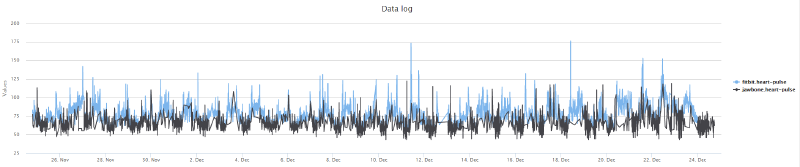
The following chart is the data I’ve collected over 3 days. In black is the Jawbone UP3 data and in blue the Fitbit Charge HR data.
Overall, the Fitbit Charge HR data is more consistent (every 5 minutes) while the Jawbone UP3 may end up having no data point for up to 2 hours. I assume this might be caused by how I’ve been wearing the bracelet but that is a weak argument.
Both devices seem to measure approximately the same amount of sleep. However the Jawbone UP3 has a nicer chart that goes into the various stages of sleep while the Fitbit Charge HR only displays Asleep/Restless/Awake.
https://cartalyst.com/